
How Searches Work
This guide explains the concepts Placefetch uses to organise and run searches so you can understand how searches are structured and work as efficiently as possible.
Boxes – the building blocks of searches
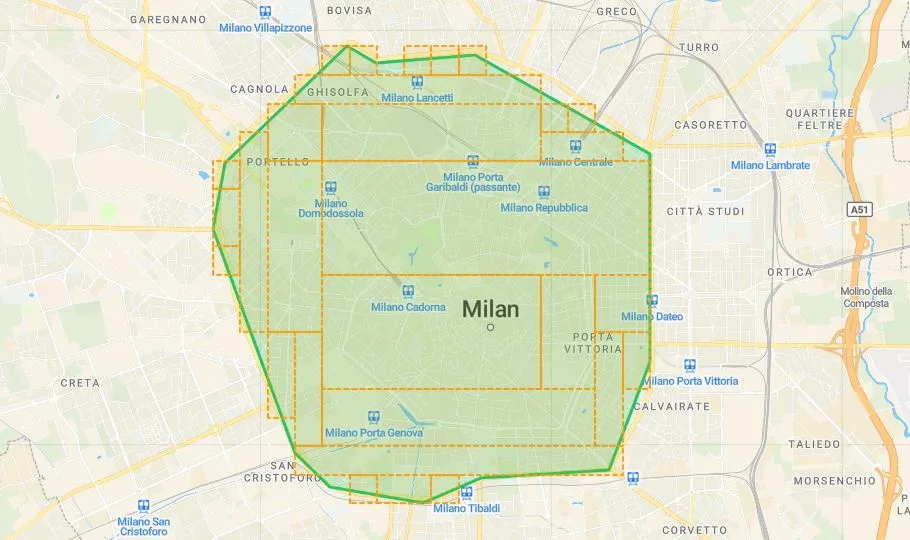
Placefetch organises each search area into rectangular bounding boxes defined by geographic coordinates. These boxes describe the area where requests will be sent to the Google Places API using your own Google Maps Platform API key.
When you draw a free‑form area (for example with a polygon), Placefetch internally represents that area as a set of smaller rectangular boxes that fit inside the shape. You do not need to work directly with coordinates for simple searches, but when you start importing or pasting data (for example from CSV), the coordinate boxes become part of the information you provide.
The geographic size and layout of your boxes affect how many API requests are required to cover a given area. For that reason, it is usually best to start with smaller test areas to understand how your settings behave before scaling to broader regions.
Recursive Searching and what it means
Search areas can vary significantly in how many places they contain. A rural region may include only a handful of matching results, while a dense urban centre may contain hundreds within the same geographic footprint.
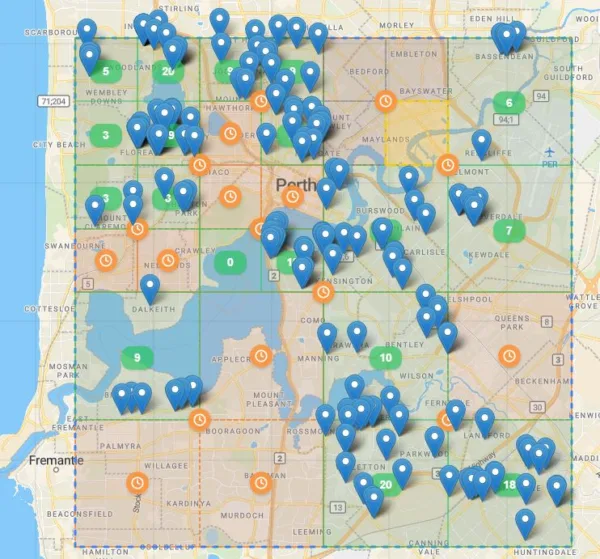
When a search area is particularly dense, a single broad request may not be sufficient to return all relevant results. In these situations, Placefetch automatically refines the area into smaller, more focused sections and queries them individually. This allows dense regions to be explored in a structured and predictable way.
This refinement process happens dynamically and requires no manual configuration. Placefetch evaluates each area as it runs and determines whether it should continue at the current scope or narrow the focus further. The result is a search that adapts to the characteristics of the geography being queried, rather than applying a fixed approach to every location.
In practice, this means:
- Less densely populated areas are handled quickly with minimal subdivision
- High-density areas are processed through progressively narrower sections
- The system automatically balances coverage and scope without requiring user intervention
All of this occurs in real time and is visualised on the map interface, allowing you to see how different parts of a region are being processed as the search progresses.
Search Terms and Results
Each search needs a text input that describes what you are looking for. This search term is sent to the Google Places API, which returns results based on Google’s own data and ranking logic. Clear, specific terms such as “Thai restaurant”, “church”, “plumber”, or “car body repair” tend to lead to more consistent results.
Less formal or conversational terms (for example “chippy” or “where to buy surfboards”) may still return useful results, but they can also match a wider range of business types depending on how those businesses have been configured in Google’s systems.

The results you see are influenced by how businesses have set themselves up in Google Business Profiles (formerly Google My Business), including the categories they select. Businesses can choose a primary category and additional categories; for example, a hair salon might also list itself under “nail salon”, which means it could appear when searching for nail‑related services in that area.
The category information returned by the Places API is based on a streamlined category set that is smaller than the full list available to businesses when they configure their profiles. This can mean that a very specific business category selected by the owner is represented by a more general category in the API response (for instance, a specialised “Vaporizer Store” appearing as “Store”). Google manages the mapping between the full category list and the API’s category set and does not publish that mapping.
Misconfigured or overly broad business categories can also affect what appears in your results. For example, a bicycle shop categorised only as “sporting goods store” might not be returned for a narrowly worded “bicycle repair” search in that location.
Placefetch connects to the Google Maps Platform using user‑supplied API keys only. Use of Google services through Placefetch is subject to the Google Maps Platform Terms of Service and applicable policies.
