
Searching with the Paste Boxes Function
If you have previously saved a set of search boxes or generated a series of areas that you would like to search, you can use the Paste Boxes feature to run searches across those predefined boundaries. The format for each line needs to be:
swLat, swLng, neLat, neLng, placeType, [maxBox]
40.758,-73.978,40.778,-73.958,coffee shop
40.712,-74.013,40.722,-74.003,restaurant,5
alternatively you can use the paired format of: “-27,27.5″,”-26.875,27.375″,church,10
If you have downloaded your boxes from the polygon search panel, they will not include the search term or max box size, so a simple spreadsheet and formula is required to add this. It is highly likely you will have stored your box coordinates in a spreadsheet anyway, so if you would like to add the search term it requires the use of the CONCATENATE formula.
Put your data in the spreadsheet in the first column, and somewhere further to the right, for example cell E1 put your search term. In the cell next to the first set of coordinates type the formula:
=CONCATENATE(A2,”,”,$E$1) – where A2 is your first row of coordinates
We are adding a comma, and then the search term. The dollar signs lock the cell to the formula. Autofill down your list of coordinates and you now have a list of boxes with search term that you can paste into Placefetch. Optionally you could add in a max box size too by including it in E1 (for example barber,5), or as part of the formula itself.
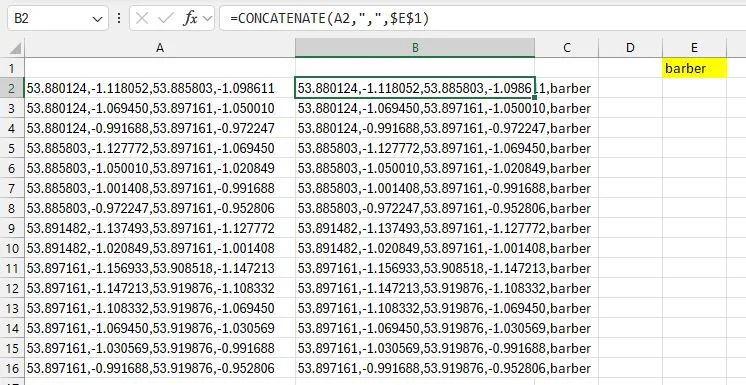
Copy the list of cells in column B into Placefetch in the paste window, click “preview boxes” and you are now ready to perform a search.
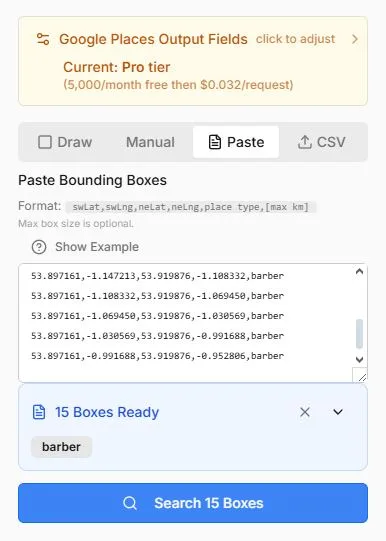
Saving and reusing box sets allows you to maintain consistent geographic boundaries across different searches. This can be useful when analysing multiple place types within the same defined area.
Searching With CSV Upload
The CSV upload feature works in a similar way to Paste Boxes. Instead of combining all values into a single line, each component is stored in its own column:
- swLat
- swLng
- neLat
- neLng
- placeType
- maxBox (optional)
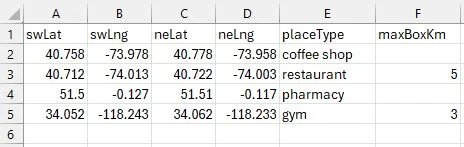
You may upload a CSV with or without a header row. A downloadable template is available within Placefetch to help ensure the correct format.
